Create an animated time series

1. Installation of sits package and its depedencies
If needed, install sits package with pip. We also need some other packages for displaying data.
[1]:
# SITS package
!pip install -q --upgrade sits
Now we can import sits and some other libraries.
[ ]:
import os
# sits lib
from sits import sits, export
# date format
from datetime import datetime
# ignore warnings messages
import warnings
warnings.filterwarnings('ignore')
[ ]:
!mkdir -p test_data
2. Loading the Satellite Image Time-Series (SITS)
As explained in the tutorial 01, we load a Sentinel-2 time series over the Banc d’Arguin.
[3]:
bbox_4326 = [-1.283356958716803, 44.54723753300113,
             -1.195282436226136, 44.63147049370678]
bbox_3035 = [3426472.0201418595, 2448438.7064564982,
             3434719.22278734, 2458751.114093349]

# instance of the class sits.StacAttack()
ts_S2 = sits.StacAttack(provider='mpc',
                        collection='sentinel-2-l2a',
                        bands=['B03', 'B04', 'B08', 'SCL'])

# search of items based on bbox coordinates and time interval criteria
ts_S2.searchItems(bbox_4326,
                  date_start=datetime(2016, 1, 1),
                  date_end=datetime(2025, 1, 1),
                  query={"eo:cloud_cover": {"lt": 10}}
                 )
# load of the time series in a lazy way
ts_S2.loadCube(bbox_3035, resolution=40, crs_out=3035)
# classes used to mask
SCL_mask = [0, 1, 3, 8, 9, 10]
# creation of the SCL mask
ts_S2.mask(mask_band='SCL', mask_values=[SCL_mask])
ts_S2.mask_apply()
ts_S2.gapfill()
3. Convert time series into animated GIF
sits package allows you to export satellite time series as animated GIF, so you can easily show some phenoma that vary in time and space.
3.1. Creating a nice-looking animation
In the xarray.Dataarray, we choose to keep only three spectral bands in order to display color composites (RGB format). To convert the xarray.Dataarray object into an animated GIF, sits package uses the geogif library. So it is possible to add specific arguments, not presented by default.
[4]:
%%time

test = export.Sits_ds()
test.ds = ts_S2.cube.compute()
CPU times: user 43.1 s, sys: 10.8 s, total: 53.9 s
Wall time: 22.5 s
[5]:
%%time

data_dir = 'test_data'
out_gif = os.path.join(data_dir, 'banc_arguin.gif')
test.export2gif(imgfile=out_gif, fps=8, robust=True,
                keep_bands=['B08', 'B04', 'B03'])
CPU times: user 1.62 s, sys: 317 ms, total: 1.94 s
Wall time: 2.33 s
3.2. Improving the animation
By default, the animated GIF displays only the raw images from the data array. Because the acquisition dates are irregular and the spectral differences between consecutive frames can be large, the animation often appears jerky, reminiscent of early 19th-century films.
To improve visual continuity, the package provides tools to:
Regularize the temporal frequency by interpolating pixel values across time
Apply a blending effect to smooth transitions between frames
This results in a more fluid and visually coherent animation, especially useful for presentations or exploratory analysis.
[6]:
%%time

test.time_interp()
test.blender()

out_gif2 = os.path.join(data_dir, 'banc_arguin_v2.gif')
test.export2gif(imgfile=out_gif2, fps=16, robust=True,
                keep_bands=['B08', 'B04', 'B03'])
CPU times: user 14.9 s, sys: 3.46 s, total: 18.3 s
Wall time: 18.7 s
3.3. Comparing Raw vs Smoothed Time Series Animations
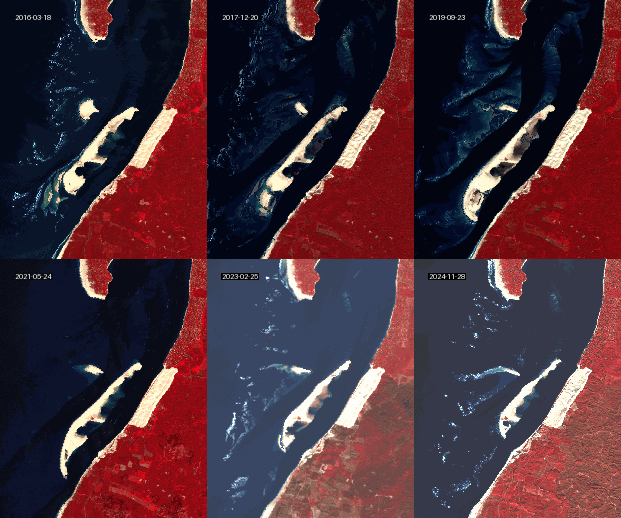
To illustrate the impact of temporal regularization and blending, we compare two animations of the same satellite time series. The first shows the raw, irregular frames, while the second presents a smoothed version with interpolated values and softened transitions.
[ ]:
%%time

from IPython.display import Image, display
display(Image(filename=out_gif))
display(Image(filename=out_gif2))
Original Animation Smoothed Animation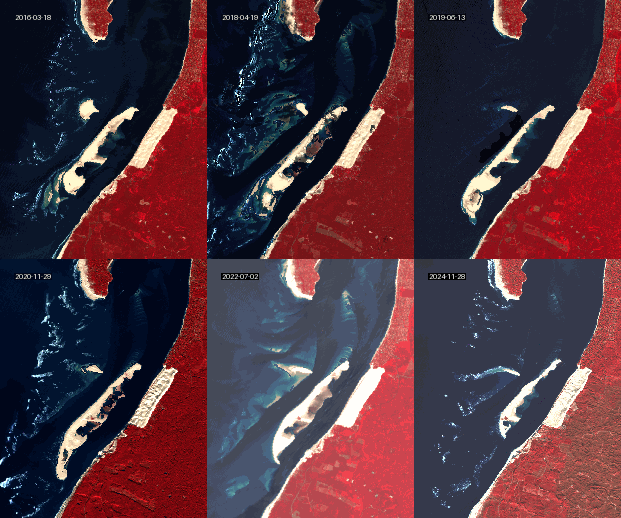
4. Convert time series into video
4.1. Default creation
The sits export module also enables the creation of video files.
[ ]:
out_vid = os.path.join(data_dir, 'banc_arguin.mp4')

test.export2vid(output_path = out_vid,
                keep_bands = ['B08', 'B04', 'B03'],
                watermark_text='sits pkg!',
                watermark_loc='top left')
4.2. Customization
The method export2vid() includes options to customize the watermark text. For instance, we’d like to drecrease the police size, the text color and opacity.
[ ]:
out_vid = os.path.join(data_dir, 'banc_arguin_v2.mp4')

text_param = {'font_size': 80,
              'color': (255, 255, 0),
              'opacity': 50}

test.export2vid(output_path=out_vid,
                keep_bands=['B08', 'B04', 'B03'],
                watermark_text='sits',
                watermark_loc='top left',
                watermark_param=text_param
               )